
How to turn your child's school photos, year by year, into one video
 By Sagie, founder of Echoes·Updated October 28, 2026
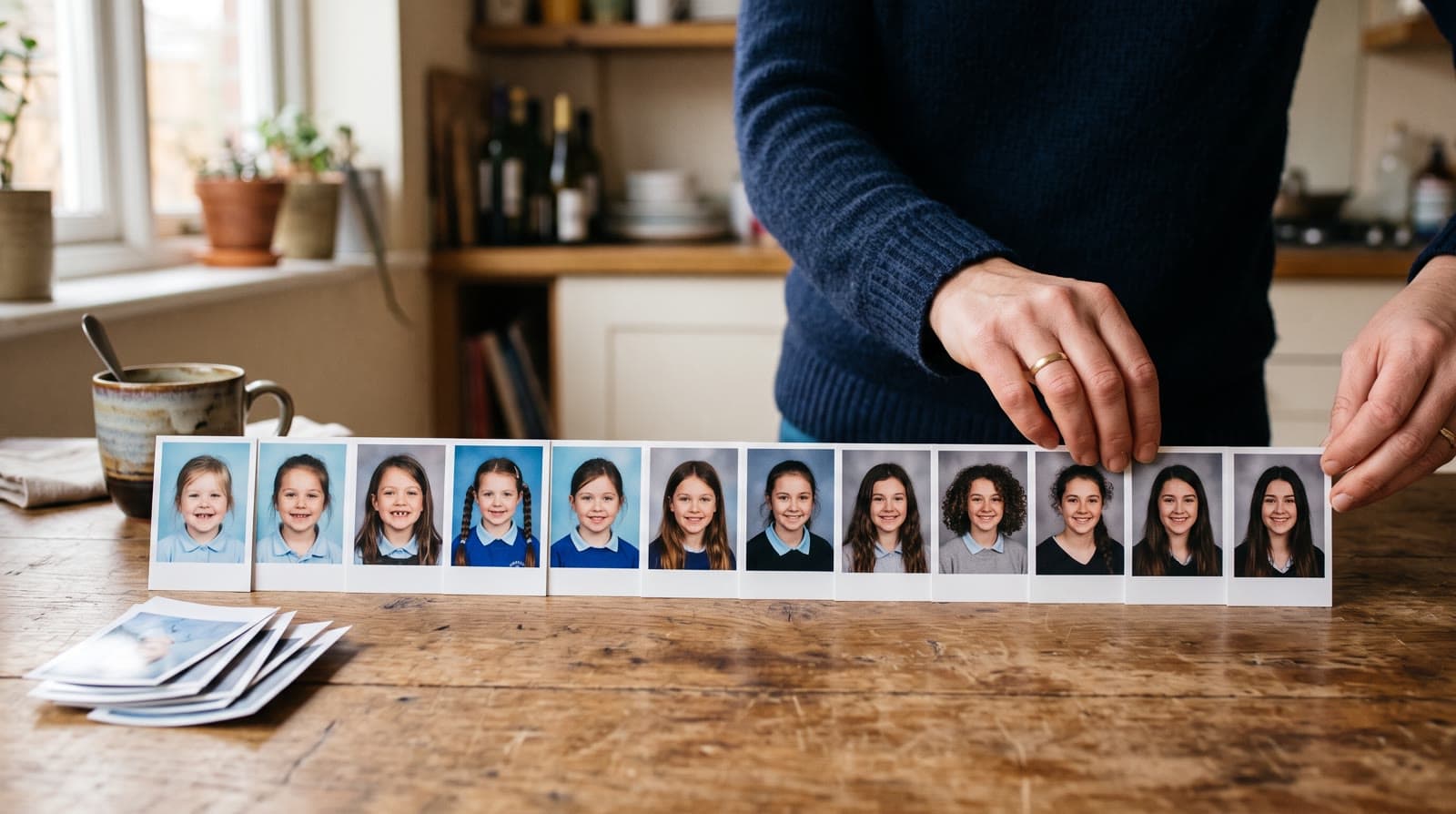
To turn your child's school photos into one video, collect one photo from each school year, like the picture day portrait or the first-day-of-school photo by the door, and upload them in order. In Growing style, each photo morphs into the next, so you watch your child grow from kindergarten to senior year in one continuous video.
Why school photos make a great Growing video
Most families have some kind of school photo series, even if they've never thought of it that way. There's the picture day portrait that comes home every fall. There's the first-day-of-school photo by the front door, with a new backpack and a nervous smile. Some parents take it in the same spot every year without planning to.
These series are close to ideal for a Growing video. The Growing style is our signature video: each photo naturally morphs into the next. School photos give it exactly what it needs:
- One photo per year. The series is already a timeline, so the order takes care of itself.
- A clear face every time. Picture day portraits are taken straight on, in good light, at a similar size.
- The same main subject. It's your child in every photo, usually alone in the frame.
The result is a short video where a kindergartner turns into a teenager, one school year at a time.
Two kinds of series (and you can mix them)
Picture day portraits. The yearly photo from the school photographer, often as a print in a package, sometimes as a digital download. The framing barely changes from year to year, which makes the change in your child stand out.
First-day-of-school photos. The phone photo you take on the first morning. These usually show more of your child, the backpack, and the doorway or the porch, and they tend to feel warmer.
You don't have to choose. If one year has no portrait but has a great first-day photo, use that one. What matters is one clear photo of your child from each year, in the right order.
How it works
- Gather one photo from every school year, plus any baby photos you want before kindergarten.
- Upload them in order, youngest first.
- Echoes morphs each photo into the next. Every consecutive pair becomes one animation. The prompt for each animation is tailored to your photos, and if you retry one, you can pick a specific animation yourself.
- Finish it with a personal opening, text slides, and music, then download one MP4.
Each step is a few clicks. The animations are created in the background, so you can leave the page and come back when they're ready.
How many photos you need
School years line up neatly with Echoes packages. Kindergarten through 12th grade is 13 school years, and the smallest package is a 1-minute video, which takes 13 photos in Growing style. So one photo per year, from kindergarten to senior year, is exactly a 1-minute video.
Each extra minute takes 12 more photos. A few common ways to get there:
- Add the years before school. Baby and preschool photos make the video start at the very beginning.
- Use two photos per year. The picture day portrait and the first-day photo, back to back.
- Stop where you are. A child in 6th grade has 7 school years so far. Add baby and toddler photos to reach 13, and make the video now.
There's more on choosing a length in how long should a video gift be.
Collecting the series
- Prints from picture day packages. Photograph each print with your phone in even daylight, straight on, without glare. Older prints, especially ones that sat on a fridge or in a frame for years, can be fragile, and the Library of Congress has a short guide to caring for and handling photographs.
- Digital downloads. If the school photographer sent a link or a file, search your email for it before you photograph the print.
- Your phone's photo library. Search for late August or early September, whenever the school year starts where you live, year by year.
- Grandparents' walls and fridges. Picture day portraits often end up there. Ask early.
A missing year is not a problem. Use any clear photo of your child from that year: a birthday, a holiday, a summer photo. The series doesn't have to be perfect, it just has to be in order.
Which photos work best
- The face is clearly visible. This matters more than anything else. If the face is small, turned away, or covered, the AI fills in the details and it stops looking like your child.
- Your child is the main subject, ideally alone in the frame, and with fewer than three people in any photo.
- Ordinary photos are fine. A crooked smile, a missing front tooth, a bad haircut year. Those are the photos people remember.
Class photos with the whole class don't belong in the Growing part. For group photos, the Classic style works best, so if you want them in the video, make a separate Classic part and place it before or after the Growing video when you compile.
When to make it
A school photo video fits almost any point in the school years:
- High school graduation, to play at the party. There's a full guide in a graduation video from baby photos.
- The end of elementary or middle school, when a stage closes. See how to make an end-of-school-year video.
- A bar or bat mitzvah, with the school years so far plus the early photos. See a bar or bat mitzvah video gift.
- An 18th birthday, or simply as a gift for the grandparents.
Finishing the video
- A personal opening with your own text, such as your child's name and the years the video covers, in a style like Album of Memories, Window of Time, or Door of Light.
- Text slides and captions. Text slides between the parts of the video can mark the stages, like elementary, middle and high school. A short caption on any animation can name the grade or the teacher.
- Music. A song your child loves, a track from the built-in library, or a custom song written for them.
- The right shape. Pick the shape that fits most of your photos. Picture day portraits are usually taller than they are wide, so portrait or square often fits. See portrait, landscape, or square.
If an animation doesn't come out right, retry it or swap the photo. Every package includes a bank of free retries sized to the package, and you can re-compile the final video as many times as you like.
If your kids are still young
If your child is in preschool or the early grades, the best thing you can do for this video is start the series on purpose. Take the first-day photo in the same spot every year, at about the same distance, with the face clearly in view. Keep the picture day portrait somewhere you'll find it. Ten years from now, the video almost makes itself.
As one customer put it:
"An amazing product that gives the craziest gift you could ask for - the ability to travel back in time on a super tangible level!"
- Lior Ovsiovich
What makes Echoes different
Echoes turns photos from across the years into one continuous video of a life. Each photo flows into the next, so a baby grows into a bar mitzvah boy, or a kindergartner grows into a graduate, in a single unbroken shot. Echoes then finishes it as a gift, ready to play at the event.
- Growing videos. You add dozens of photos of the same person or couple, and Echoes morphs each one into the next. It isn't a slideshow or a set of separate animations: you watch someone grow up or grow old in one continuous video. It fits bar and bat mitzvahs, graduations, and family tributes.
- Automated, but guided. Echoes does the heavy lifting: it picks the AI models, writes the prompts, generates the animations, and stitches everything into one finished video. You still decide everything that matters. It walks you step by step through ordering your photos, reviewing each animation (with a full set of free retries), and choosing the opening, the ending, and the music. You get the result of a skilled AI video workflow without having to learn one.
- A finished gift, not a tool. The result is a complete video with titles, an ending, a soundtrack, and a share link. It's priced by the length of the finished video, not by credits or tokens: a one-time purchase, with a 30-day money-back guarantee.
The school photos are probably already in a drawer, on the fridge, and in your phone. Line them up by year and let the Growing video do the rest. Your first animation is free to try.

About the author
Sagie, founder of Echoes
Sagie is the founder of Echoes. He built it in 2025 after piecing together an AI video gift from his mother's old childhood photos for her 72nd birthday, and has since helped hundreds of families turn their own photos into video gifts.
Frequently asked questions
- Can I mix school portraits with photos from my phone?
- Yes. The video doesn't need every photo to come from the same source. A picture day portrait one year and a phone photo by the front door the next work fine together, as long as your child's face is clearly visible in each one and the photos stay in order by year.
- I have two or three kids. Can they share one video?
- Give each child their own video. A Growing video follows one main person from photo to photo, so it works best when the same child is in every photo. Each video is a separate project in the same account, with its own photos, music and opening.
- Can the grandparents watch it if they live far away?
- Yes. The finished video comes with a share link and downloads as an MP4, so you can send it on WhatsApp or by email, or load it onto a digital frame. Anyone with the link can open the video, so send it only to the people you mean.
- Are my child's photos private?
- Yes. Your photos are private to you and stored securely. They are never used to train AI models and are only used to create your video. You can delete your photos and videos at any time from your account dashboard.
- How long does it take to make?
- Most people finish their whole video in under 30 minutes once the photos are gathered. The animations are created in the background, so you can leave the page and come back when they're ready, then add the opening and the music and compile the final video.
- What does it cost?
- It's a one-time purchase, not a subscription, priced by the length of the finished video, with a 30-day money-back guarantee. Every package includes a bank of free retries sized to the package, plus the AI opening, music, title cards, and re-compiling the final video as many times as you like.