
A bar or bat mitzvah video gift from their growing-up photos
 By Sagie, founder of Echoes·Updated October 5, 2026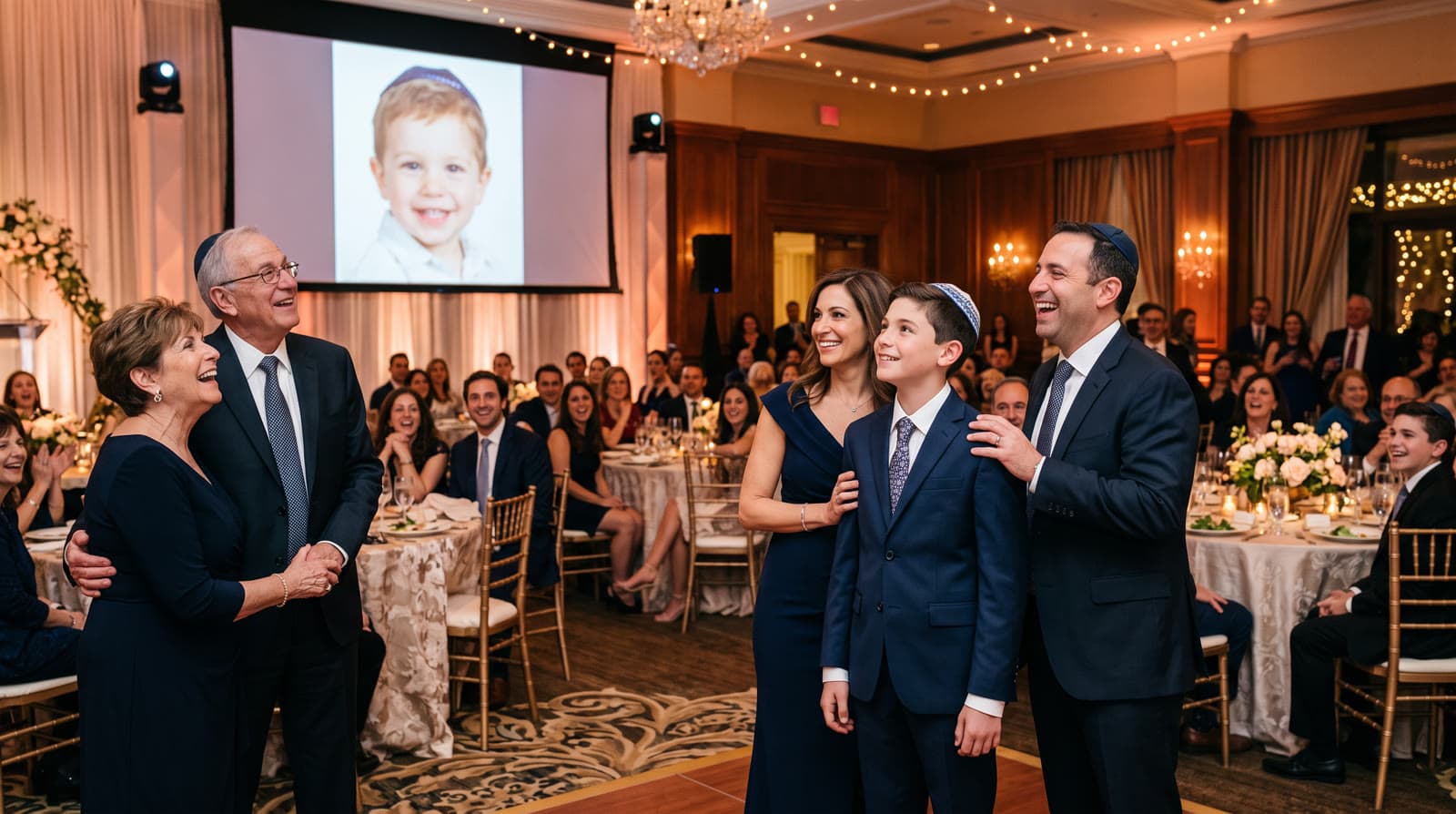
A bar or bat mitzvah video gift takes photos of the child from their earliest years to today and blends them into one continuous Growing video - so the whole simcha can watch them grow up in one piece, set to music with a personal opening.
Why a Growing video fits a bar or bat mitzvah
A bar or bat mitzvah marks the moment a child steps toward adulthood - which is exactly why seeing how far they've already come is so moving. Parents have the photos: the newborn, the first day of school, this year. What they don't have is a way to put them together so everyone feels the passage of time at once.
That's what the Growing style does. Instead of a slideshow, each photo blends into the next, so you watch the child grow up in one continuous video.
It's the moment families tell me stays with them:
"Since I launched Echoes, hundreds of families have gotten this gift - and felt the emotion, the excitement, and the warmth of seeing their loved ones over the years."
- Sagie, founder of Echoes
How to make one
- Gather photos across their childhood - earliest first, from their first years to today. Phone photos and scanned prints both work.
- Upload them in age order. Each consecutive pair is blended into one animation; the motion style is chosen automatically, or you can pick it yourself.
- Finish it. Add a personal opening with your own text, a closing title card, and music - your own song, the built-in library, or one generated for you. Then download.
Each step is a few clicks, and the animating runs in the background, so you can start it and come back when it's ready.
Gathering the photos
The early baby photos are often the most moving, and they're usually the ones on a grandparent's shelf rather than your phone. It's worth asking family early: a quick message to the group for a few clear photos from years you don't have. If those old ones are prints, you don't need a scanner - photograph each one in even daylight, straight on. For fragile prints, the Library of Congress has a short guide to caring for and handling photographs worth a look.
Which photos to choose
- Photos spread across the years make the growing-up feel real rather than jumpy.
- The face clearly visible in each one. This matters most: if a face isn't clear, the AI fills in the details and it stops looking like the child - so skip those.
- The same child as the clear subject, ideally with only a couple of other people in the photo.
For help deciding which to include, see how to choose photos for a video gift.
Finishing it: opening, music, and titles
The finishing is what turns the growing-up into a gift:
- A personal opening with your own text - the child's name, a date, or a line for them - in a style like Album of Memories, Window of Time, or Door of Light.
- Music - your own song, a built-in library, or a custom track generated for you.
- A closing title card with a short line for them at the end.
You can re-compile the final video as many times as you like, and every package comes with a full set of free retries (one for every animation), so nothing is locked on the first try.
Start a couple of weeks ahead
The only part that takes real time is gathering the photos, especially the early ones that live with relatives. Give yourself a week or two before the simcha to ask around and collect them - a great-aunt's photo of the baby years is worth the wait. Once the photos are in hand, the video itself comes together in well under an hour, so there's no need to leave it to the last night.
Showing it at the simcha
The video is an MP4, so you can play it on a screen at the hall between courses, share it in the family WhatsApp afterward, or load it onto a digital frame at home. It's a gift the child keeps long after the party. For group photos, the Classic style works best.
It's a one-time purchase priced by the finished video's length, with a 30-day money-back guarantee, and your first animation is free to try. Your photos stay private and are never used to train AI models.
Planning one for a bar or bat mitzvah? The bar and bat mitzvah video gift page shows examples, how it works, and pricing.

About the author
Sagie, founder of Echoes
Sagie is the founder of Echoes. He built it in 2025 after piecing together an AI video gift from his mother's old childhood photos for her 72nd birthday, and has since helped hundreds of families turn their own photos into video gifts.
Frequently asked questions
- How long does it take to make?
- Most people finish in 15-30 minutes. The animations are created in the background, so you can start it and come back when it's ready rather than waiting.
- How many photos should I gather?
- As many as you can across their childhood. Each consecutive pair becomes one animation, so 13 photos give you 12 blends. The smallest package is a 1-minute video, which takes 13 photos in Growing style, and each extra minute takes 12 more - the more you gather, the fuller the story.
- What does it cost?
- It's a one-time purchase priced by the length of the finished video, not a subscription, with a 30-day money-back guarantee. Your first animation is free, and retries and re-compiling the final video are included.
- Can we show it at the hall and also post it?
- Yes. It's an MP4 you can play on a screen at the venue, and because the shape follows your photos it also works vertically for Stories, Reels, or the family WhatsApp.
- Can I add a dedication or the child's name?
- Yes. The video opens with a personal opening with your own text, like a name and a date, and you can end it on a closing title card with a short dedication.
- Which photos should I leave out?
- Any where the face isn't clearly visible - turned away, tiny in the frame, or hidden - since the AI would fill in the details and it wouldn't look like them. Every package comes with a free retry for every animation, so you can test a borderline one and swap it.
- Are the photos private?
- Yes. Your photos are private to you, stored securely, and never used to train AI models, and you can delete them anytime from your dashboard.